
When Adobe recently released Lightroom 14.5, there’s one tiny feature I almost missed. Well, I did miss it until today when I discovered it by accident. It’s one of those things that’s so small you might not even notice it - I didn’t - but it can make a big difference and it’s something I think people have been wanting for a long time. You can now copy and paste only the parameters that have changed in an image.
In previous versions, when you went to copy the edits from an image, the copy window would have the checkboxes checked for whatever you had checked in the previous session. This was also shared between the copy and paste dialog and the make new preset dialog. (I think)
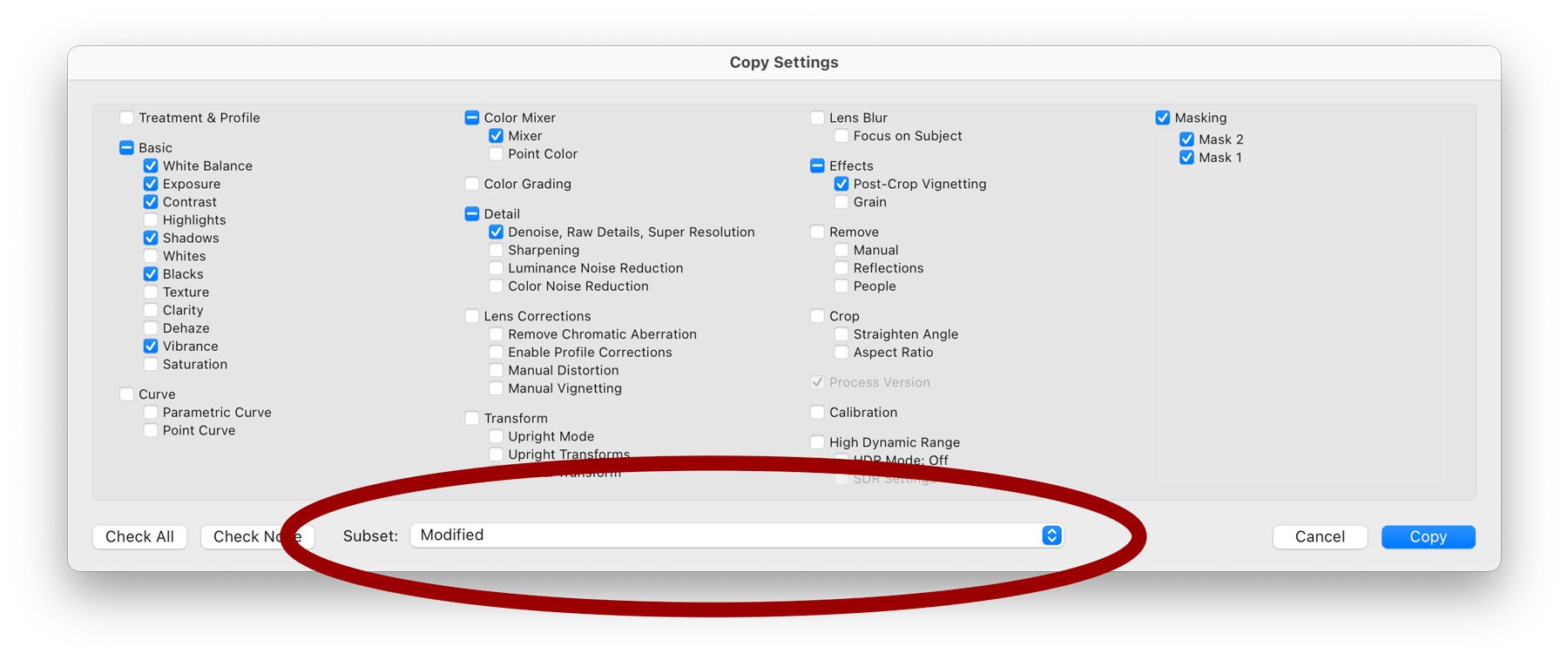
In the latest version, Adobe added the ability to create sets of these checkboxes. So if you commonly copied only certain settings, you could save that as a set. I covered this in a previous post. However, and I don’t know how I missed this, in the “subset” pop-up menu at the bottom of the copy and paste (and new preset dialog), there is an option called “Modified”. If you select this, Lightroom will automatically check the boxes for whatever parameters you had changed in the image. This is somewhat like how the copy and paste adjustments function works in Capture One, for example. It’s also how the “Previous” button works (sort of). This is probably how most people would want to use this, so it should probably be the default. You can, of course, uncheck any of the adjustments you don’t want to copy.
Now, if anyone from Adobe is listening, in a similar vein to this, please give us the option to use the Previous function WITHOUT the crop. Maybe, holding down Option and clicking on the previous button, would copy the changed parameters from the previous image but ignore the crop. PLEASE!!!!