
Adobe has unveiled the latest update to Lightroom Classic. Most of the improvements are under the hood or behind the scenes type things, although there is one major new user facing feature. Here's a breakdown of what's new:
Adaptive Profiles
The new Adaptive profiles offer image-adaptive adjustments in colour, tone, and contrast for RAW images. This had previously been demoed in Camera Raw in the Photoshop beta, but it’s now in Lightroom.
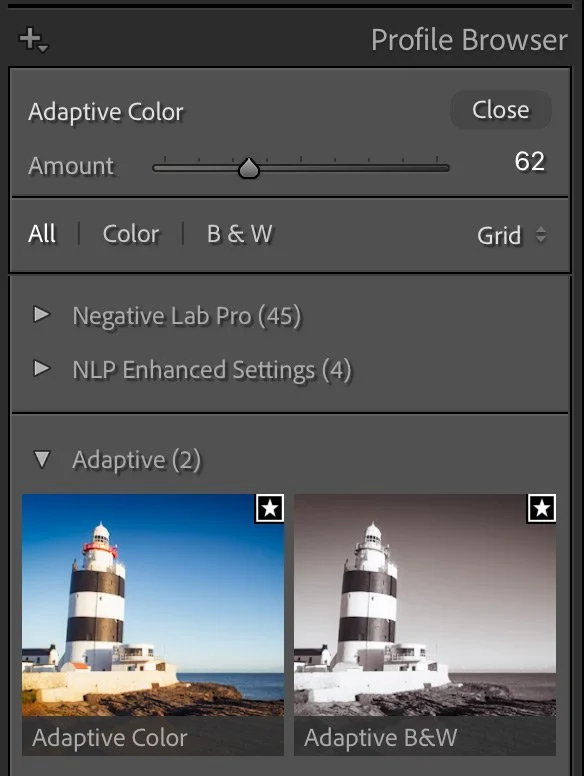
To apply an Adaptive profile:
- In the Develop module, go to the basic panel, then click on the profile browser icon.
- Select 'Adaptive' and choose either 'Colour' or 'B&W' depending on whether you want colour or black and white.
- Adjust the intensity using the slider, which ranges from 0 to 200.
- You can also apply to batches of images. To apply to a batch, select multiple images in the filmstrip (they must be RAW files, and ensure Auto-sync is enabled) and choose 'Adaptive Colour' or 'Adaptive B&W' from the Profile drop-down menu in the Basic panel.
I’ll be honest - I don’t quite get the point of this. It looks to me like it just flattens everything out and it’s not particularly appealing. They say it works best with HDR images so maybe thats what it’s aimed at. I guess the idea is that it evens out exposure and colour between images but it just looks a bit “meh” to me. It’s like doing Auto levels but in a profile. Maybe I’m missing something? I’ll keep playing with it and report back if I have any revelations!
Performance Improvements
The 14.2 update brings significant performance enhancements, ensuring a smoother and more responsive editing workflow:
**Masking Enhancements: **The brush tool in the masking panel should new be more responsive.
Crop Rotation Improvements: Angle adjustments have been improved and should be less laggy, especially on high-resolution images, or images with lots of masks
White Balance Adjustments: The Temperature and Tint sliders now operate more smoothly.
Tether Enhancement - Focus Point Selection
For users of Sony, Canon, and Nikon cameras, Lightroom Classic now allows you to select focus points by clicking anywhere on the tethered live view window. This feature lets you choose different autofocus modes directly within the live view window, enhancing both functionality and user experience.
Catalog Backup Management
Managing your catalog backups is now more straightforward with a new backup panel located in Catalog Settings > Backup. You can easily access backup locations, check backup sizes, and delete older backups. Additionally, it's possible to remove single or multiple backup catalog entries from the list without deleting the actual backup files from their location.
Support for New Cameras and Lenses
The update includes support for the latest camera models and lens profiles. For a comprehensive list of supported devices, refer to Adobe's official documentation.
For more details see Adobe’s official webpage on the changes. The other Photography applications in the suite have also received updates, including Lightroom Desktop which now includes (finally) dual monitor support!!!