

DXO has released ViewPoint 6, the latest version of its software for correcting geometry, perspective and distortion. The big change in this version is the addition of AI masks to ReShape Fusion, the tool for adjusting individual parts of a scene within the frame. You can now apply a geometric correction to one element of an image using AI selection to mask the area.
The software also works with RAW files and has basic RAW editing tools, including exposure compensation and white balance. I've written about how useful ViewPoint can be before, when I pointed out how to use it to fix the "stretchy people" effect you get at the edges of wide-angle shots.
I should say up front that I haven't had much time to try ViewPoint 6 out myself yet, so this is more of an announcement than a review. I may follow up with my own thoughts once I've spent more time with it. For now, here's what's new in version 6.
AI Masks in ReShape Fusion
If you have elements within a scene that still look distorted, even with conventional distortion correction, View Point lets you correct that element independently. This tool is in ViewPoint 5, but you had to manually isolate and correct the element you wanted to correct. With the new AI masks, ReShape Fusion can isolate that element for you, and you can control how far the change spreads into the rest of the image.
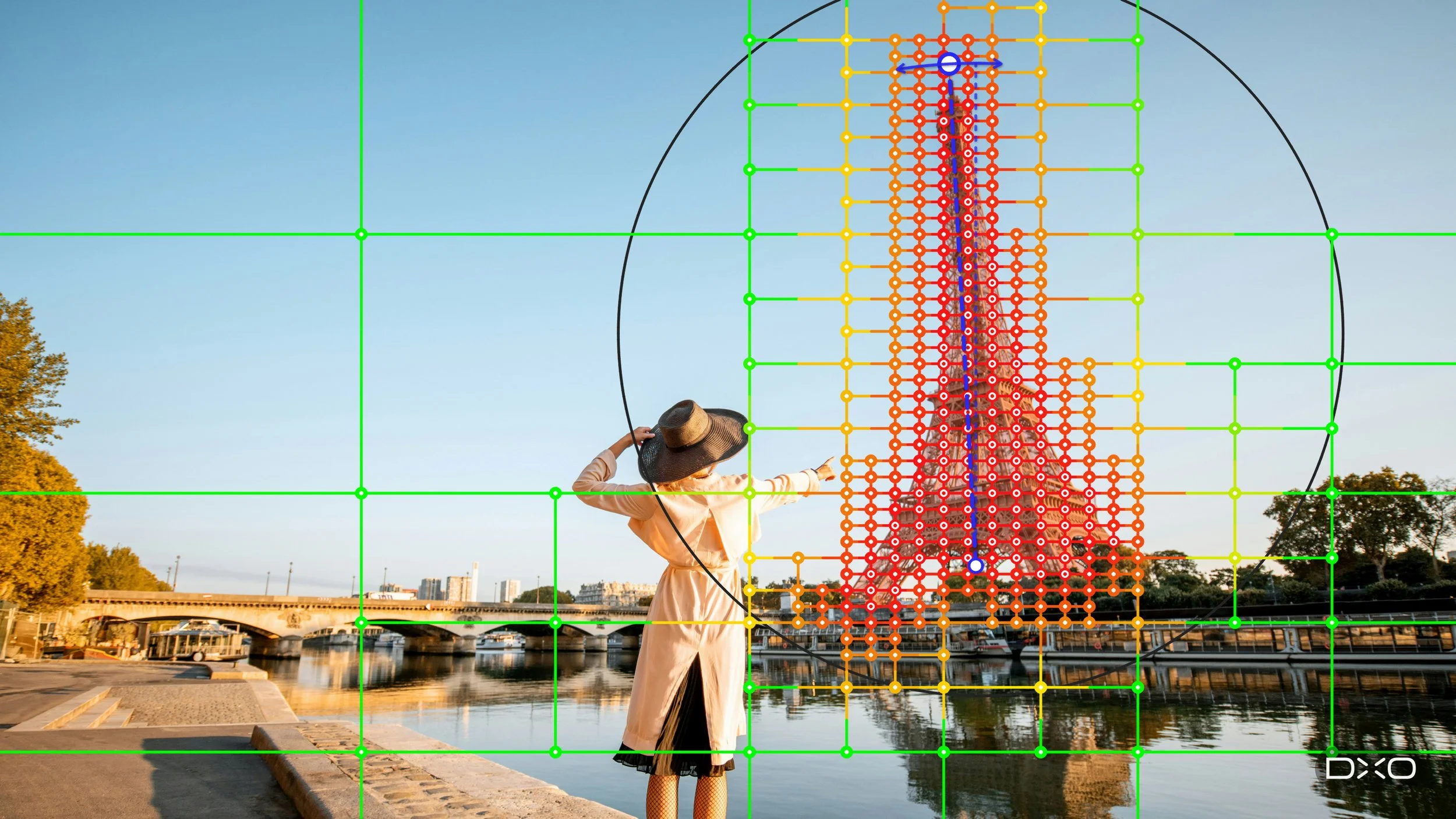
One example of where this can be useful is when cropping. Conventional perspective tools work on the whole image. When you straighten converging verticals, the entire picture plane tilts, the rectangle becomes a trapezoid, and you have to crop to get a rectangle back. The stronger the correction, the more of the image you lose. By working on a single element instead, DXO says that for many images the correction no longer costs you the edges of the frame.
DXO is also keen to point out that nothing is generated here. ViewPoint doesn't create new pixels or fill anything in at the edges. It rearranges what's already in the photo, and the dimensions of the frame stay the same. That's a different approach from the generative fill tools some other applications now use for this kind of problem.
AI Selection, Not Generative AI
It’s important to note that the AI part of this tool is limited to making the selection. The corrections themselves are still done by hand.
You start by drawing a rectangle around the subject. ViewPoint then detects the element inside it and builds a mask that follows its outline. The mesh used for the correction is built to match that outline, so the control points sit on the subject itself rather than on a uniform grid across the whole image. The density of the mesh also varies, with a coarse grid in areas that don't need changing and a finer one where you're working.
From there, you adjust the mesh directly. You can:
Subdivide regions for finer control, or merge them where you don't need the detail
Direct the subdivision inside or outside the selection
Switch individual control points on or off
Control how far a change reaches into the rest of the image
That last one is important, because reshaping one part of an image always pulls on whatever is around it. DXO gives the example of a face near the edge of a group portrait, which can be brought back towards normal proportions while limiting how much the adjustment affects the people beside it. The same mesh can also be used to reposition or resize an element that looks out of proportion with the rest of the scene.
The Other Geometry Tools
The rest of ViewPoint's toolset carries over from the previous version. The software is built around three common geometry problems, all of which become more noticeable with wide-angle lenses:
Barrel distortion, where straight lines bow outwards
Converging verticals, caused by tilting the camera
Volume deformation, where subjects near the edge of the frame look stretched
Lens distortion is corrected automatically using DXO's lens modules, which are based on lab measurements of thousands of camera and lens combinations, and the maximum field of view is preserved. Volume Deformation corrects stretching at the edges horizontally, vertically or both. There are also automatic and manual perspective tools for full-frame corrections, with ReShape Fusion handling the localised adjustments, along with horizon correction and the Miniature Effect.
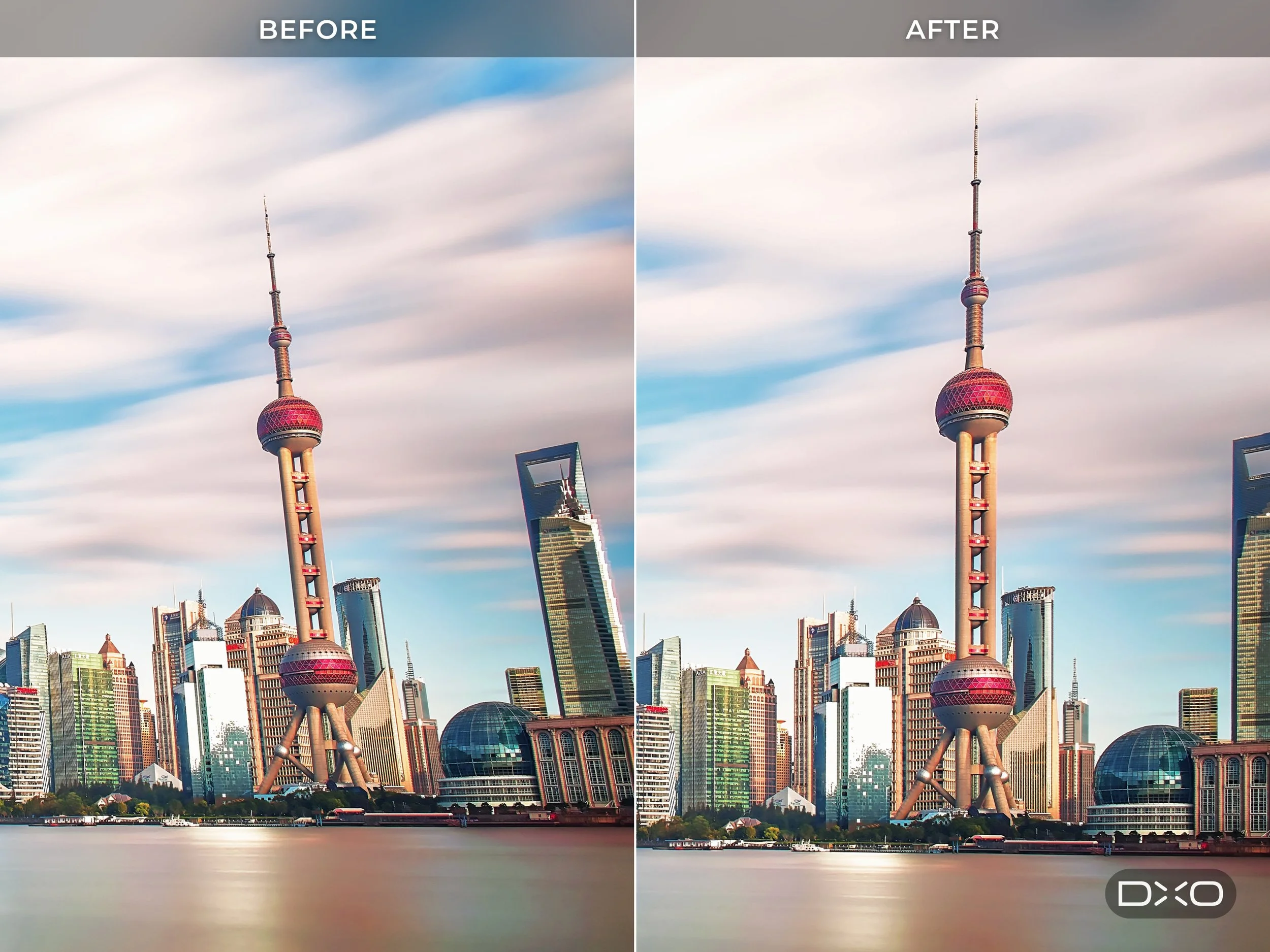
ViewPoint tends to be thought of as a tool for architecture, and that's where it's most obviously useful. But the same problems come up in interiors, real estate, events, travel, street, portrait and landscape photography, so it's applicable to a lot more than buildings.
RAW Editing
ViewPoint 6 can open RAW files directly in the standalone application, along with TIFF and JPEG, without converting them first or round-tripping through another application. RAW files are rendered using DXO's own camera profile in the DXO Wide Gamut colour space. ViewPoint also reads the image metadata to download and apply the matching DXO Camera-Matching Profile, and corrects distortion automatically.
There are two new controls for preparing the image before you start on the geometry:
Exposure Compensation, with a range of -4.00 to +4.00 EV, available for all formats
White Balance, with presets, Temperature and Tint sliders and an eyedropper for RAW files. JPEG and TIFF files get a single slider and the same eyedropper.
Editing is non-destructive. Corrections are saved to a sidecar file next to the image, so the original file is never changed, and your edits are still there when you reopen the image later. ViewPoint's sidecar files are kept separate from the ones PhotoLab writes, so the two applications won't interfere with each other. However, to bake in the distortion correction for use in another application, you will still need to export the corrected image. Finished images can be exported as 8-bit or 16-bit TIFF, or as JPEG.
Standalone, Plug-in or Inside PhotoLab
ViewPoint 6 works as a standalone application and as a plug-in for Lightroom Classic, Photoshop and Capture One. If you own PhotoLab 10, the ViewPoint tools are integrated directly into PhotoLab's Geometry palette.
Availability and Pricing
ViewPoint 6 is available now from the DXO website for macOS and Windows. Pricing is as follows:
New Licence: $129.99 | €119.99 | £109.99
Upgrade (from ViewPoint 5): $84.99 | €74.99 | £69.99
There's a 30-day free trial available from the DXO website.
You can use my code: ThomasFitzgerald15 to get 15% off (new customers only, I'm afraid).
This isn't a sponsored post; however, I'm on DXO's affiliate programme, so if you use my code, I get a small commission, but DXO has no input into what I write.