

In this week’s photo software news….Lightroom’s latest mobile tools offer new ways to rescue photographs, while Topaz has released fixes that should interest Mac users. The controversial PhotoCraft also continues its development, although there are still good reasons to approach it cautiously.
Lightroom can now open closed eyes using generative AI
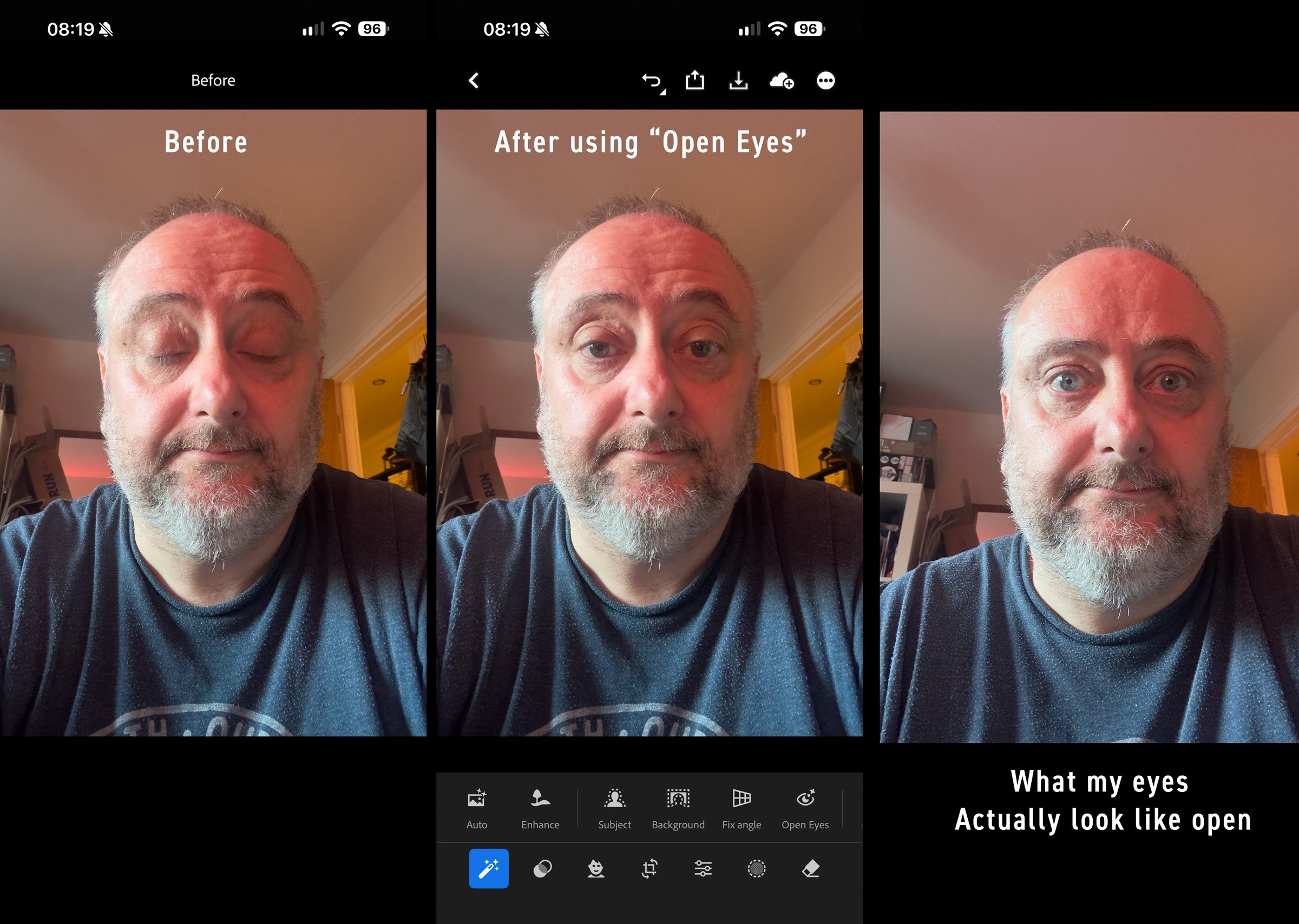
Adobe introduced Open Eyes for Lightroom Mobile on 19 October, offering a quick correction for portraits in which somebody has blinked. When Lightroom detects closed eyes, it presents Open Eyes as a Quick Action and generates a replacement. Adobe says the feature is available free of charge. Its official announcement also explains that photographs of the same person from your Lightroom library can help match their eye colour, shape and size.
It addresses a common problem that many photographers have, especially with group shots where everybody looks good except for one person. Photographers have long repaired these images in Photoshop by copying open eyes from another frame, but that requires a suitable alternative photograph and some careful compositing.
The distinction is that Open Eyes can generate detail without a reference, although it does look for reference photos before it does its thing. I just did a quick test on a selfie, and it does actually work, and it works reasonably well too, although I’ve only tried one photo yet. But my eyes are kind of weird, and it still managed to fix them, although it’s not 100%. The problem is, especially with close-ups, that closing your eyes affects the surrounding muscles too, so there’s more that changes than just your eyes. Still, it’s a useful tool, although I don’t understand why this is limited to Lightroom Mobile.
Speaking of Lightroom Mobile, Generative Expand is now available on Lightroom Mobile, allowing photographs to be extended beyond their original boundaries. This could be useful when adapting a landscape photograph to a vertical format or adding space around a tightly framed portrait. Both tools are presented as available mobile features, rather than previews.
Topaz Photo fixes processing problems, with an important Mac caveat
Topaz Photo 1.7.1, released on 22 October, increases the input limit for local Denoise Max processing and fixes several problems involving installation, upscaling and GPU compatibility. These include failures when installing Wonder, issues with High Fidelity v3 and Standard MAX on Intel GPUs, and output dimensions being approximately one pixel off when specific enlargement dimensions were requested. The official release notes also list a fix to Topaz’s processing backend on macOS 27.
The most significant qualification concerns Apple M6 Macs running macOS 27. Topaz says initial image analysis can take 15 to 30 minutes while the AI models initialise and build their cache. Subsequent processing should return to normal speeds, but the company acknowledges that the initial delay is unintended and says its investigation is continuing.
That is worth knowing before assuming the application has frozen. It also means this update should not be read as confirmation that all compatibility problems on those machines have been resolved. For affected photographers, the distinction between a long first load and consistently slow processing will matter considerably.
PhotoCraft continues development, and strangely, hasn’t been sued yet.
PhotoCraft 0.16.0 arrived on 25 October, continuing the fast development of ArtCraft’s open-source Vibe-coded Photoshop clone. According to its release notes, the update improves aspects of PSD compatibility, keeps several smart filters editable, corrects behaviour in 32-bit adjustments and addresses problems across colour handling, cropping and layers.
I remain sceptical of treating PhotoCraft as a dependable Photoshop replacement at this stage. In my opinion, it is, to all intents and purposes, an attempt to pirate Photoshop, albeit through an unorthodox and roundabout way. I’m just surprised that Adobe hasn’t issued a cease and desist yet, although I suspect that lawyers for Adobe realise that this could end up being a game of whack-a-mole if they don’t address the root cause, which is vibe-coded reverse engineering, and I suspect that will take longer to deal with. They may also be hoping the buzz around this dies down or that it ends up being so bad that no one uses it, because the company is in a lose-lose situation here. There will be substantial bad press for them if they go after the developer, but at the same time, they have to protect their patents. Anyway, we will see what happens.
If you want a Photoshop alternative, I strongly suggest that you consider something like Affinity instead, as it’s a proper application created by a legitimate developer who isn’t attempting to steal another piece of software through the back door. Even if you hate Adobe with all your passion, this is just wrong. In my opinion, anyway. And if you do hate Adobe so much, why do you want an exact copy of an application that you claim to hate anyway?
Bonus Photo Hardware News: Sigma announces the FP2
Sigma’s 23 October announcement confirms that the FP2 will become available on 11 November 2026. It continues the modular approach of the original fp series, with a 24.5-megapixel partially stacked full-frame sensor, a tilting screen, improved autofocus and shooting at up to approximately 20 frames per second.
The camera also includes 70GB of internal storage alongside its SD card slot. Video features include 6K Open Gate recording, ProRes RAW and Leica L-Log, while 32-bit float audio requires the appropriate optional hot-shoe unit and compatible Panasonic accessories.
For anyone who also shoots video, the attraction is a small camera that can be adapted to different jobs. Whether that compactness survives the addition of a viewfinder, audio accessories and a practical shooting rig remains to be seen, although it is ideal for things like gimbals and drones where you need a bare-bones setup. PetaPixel did a good review of this on YouTube if you’re interested.