
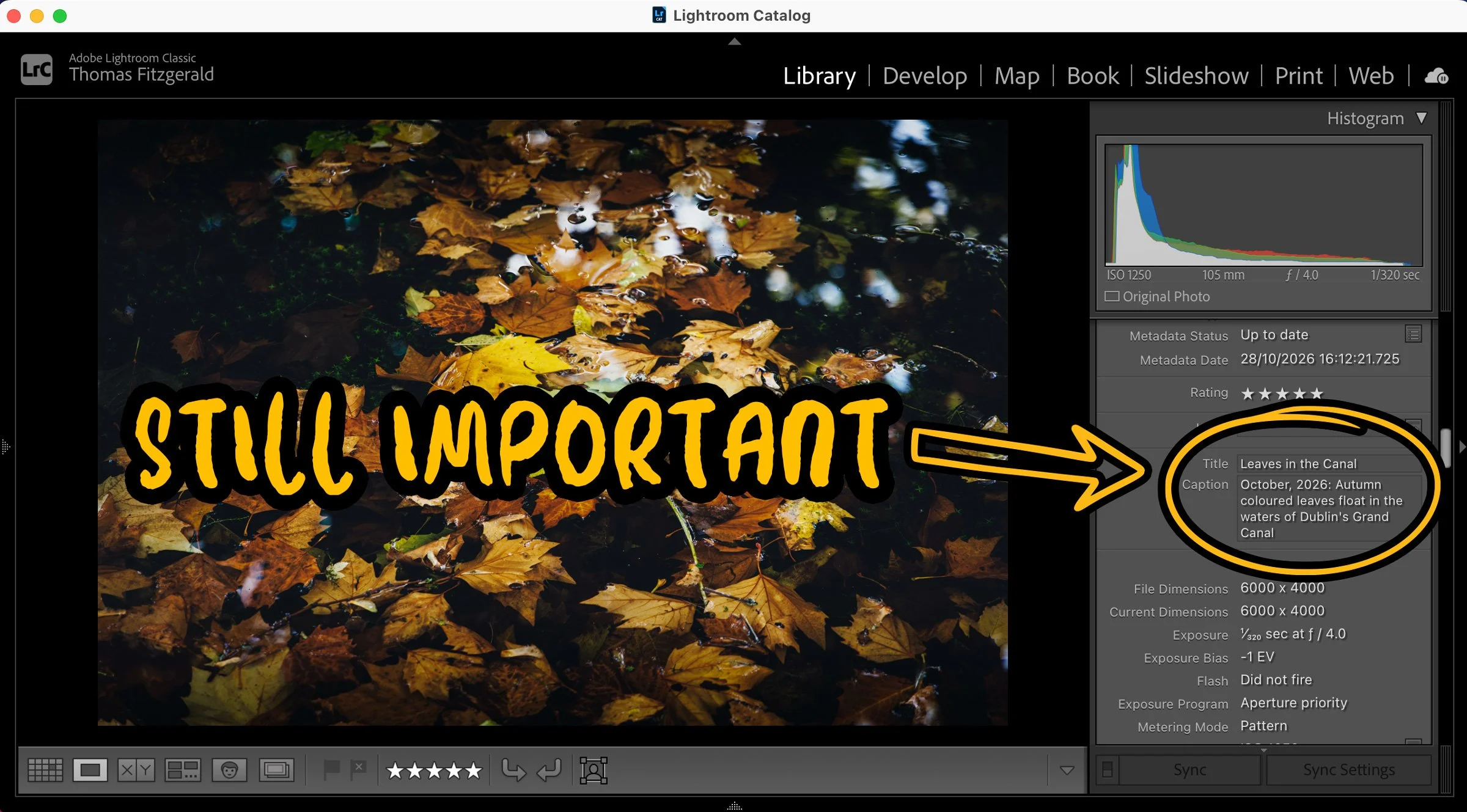
After my recent video on using Siri to add captions and keywords to photos, someone on social media asked a question that kind of took me aback: “What's the point?” I had assumed everyone who was in any way into photography understood the benefit of adding keywords and captions, but I guess not. The more I thought about it, the more it made sense in a way. Phones recognise faces. Most software (except Lightroom Classic, because…Adobe) can find "dog on a beach" without a single piece of user-generated metadata, and AI seems to know what's in every picture. So why bother writing anything by hand?
The short answer is that metadata is still very important, even in 2026. It’s how stock agencies and picture editors find your images, and how search engines and AI assistants understand them. Othe metadata is how your name and copyright travel with the file, and how you state whether a picture can be used for AI training. It’s how you embed your usage rights and a link to your website. Titles and Captions in particular can be a bit of a pain, but tools like Siri now make writing them almost effortless. In the current era, they matter for more reasons than ever, not fewer.
(Just to be clear, I understand that many of my readers probably understand this already and may find some of this patronising, but I’m really not trying to be. It’s important to realise that maybe not everyone knows this stuff, so that’s why I’m writing this)
Captions and Keywords Oh My!
So what exactly is a caption and what is a keyword?
Caption: a sentence or two describing the photo: who, what, where, when, and sometimes why. For example: Commuters crossing O'Connell Bridge in the rain, Dublin, on the morning of the first storm of the season. This is often a more detailed description than a straigth up “title” although the title is important too.
Keywords: short, searchable tags. For example: Dublin, O'Connell Bridge, rain, umbrellas, commuters, street photography, Ireland.
Other similar metadata, which may be required depending on where you’re sending the file, is a separate “title”: usually a shortened version of the Caption and maybe location data. If you’re a press photographer, there is a bunch of other stuff you need to submit too.
It’s also important to understand that this metadata is attached to the file when you export it (unless you explicitly tell it to strip that data out) and isn’t application-specific. In apps like Lightroom, Capture One, or Apple Photos, captions and keywords can be written into the image file itself using a standard format (such as IPTC metadata). One caveat here is that while all applications should treat this equally, some can be problematic, especially when it comes to keywords. There’s also a whole thing about hierarchical keywords, but I’m not going to get into that here.
There are several cases where you actually need to have metadata in your image files.
1. If you sell or license photos.
For anyone who earns money from photography, adding Captions and Keywords is often not optional.
Stock agencies require keywords. Upload to iStock, Adobe Stock or any of the others, and their search engines rely heavily on the title, caption and keywords you supply. A great photo with no keywords is, in practical terms, a photo nobody can find.
It's the same with direct licensing. When a picture editor or a company's marketing team needs, for example, "Dublin street scene, rain, people with umbrellas", they search either your online archive, or ask you to search your own database. If your archive is captioned and keyworded, you can answer that request in minutes instead of digging through folders. When I've licensed images to clients in the past, being able to quickly find and quickly prove the details of the right shot has mattered as much as the shot itself.
Captions and metadata can also carry the facts a client actually needs: where it was taken, when, and who's in it. That's the difference between "nice photo" and "usable photo" for editorial work.
2. Search engines, even with things like Google’s AI answers, still read your captions.
If you post photos on your own website, words are still how they get discovered. Search engines look at the alt text, the caption, the filename and the text around an image to work out what it shows. Captions are also one of the most-read parts of any page: people who skim an article still tend to stop and read them.
A lot of people now ask an AI assistant rather than typing into a search box, and those tools lean on the same text signals to understand what an image on your page is. A photo with a clear, specific caption gives them something concrete to work with. A photo with nothing gives them nothing.
There's a nice practical benefit too. Some website platforms and plugins can pull the caption or title from your image's metadata when you upload it, so writing it once in your photo app can save you from writing it again on the web. WordPress does this, for example. Squarespace used to do this, but it’s been broken for quite some time now (but that’s another rant). Some will set this as alt text, although technically Alt text is a different field.
3. Accessibility and the importance of good alt text
People who use screen readers can't see your photos. They rely on alt text, which is read aloud in place of the image. If that text says "IMG_4821" or nothing at all, they get nothing.
Alt text and captions aren't quite the same thing. Alt text describes what's visible; a caption adds context. But if you've already written a careful caption, writing alt text can be a lot quicker, and in many cases, you can use the same thing. Some people think alt text is just for search engines; it’s not. And you may be thinking, why does a blind person want to look at a photograph? But alt text can help people with all kinds of visual impairments and not just complete blindness. The IPTC standard even has dedicated fields for alt text and extended descriptions, so it can live in the file alongside everything else, although most online sites may not read this data.
4. Finding your own images in the future
Even if you don’t submit to stock photo agencies or post online, it’s still useful to have Captions and Keywords on your images when it comes to finding them in the future. While some tools, such as Apple’s Photos and Lightroom Desktop (cloud version of Lightroom), support AI-based image recognition search, others, such as Lightroom Classic and Capture One, do not. Search in these applications still relies on metadata, so if you want to be able to find files in the future, you need to have metadata added to your images.
The importance of other metadata when it comes to your rights, and AI training
The same metadata panel where you type a caption also holds your name, a copyright notice and licensing links. Those fields are not just for show. Google Images reads the Creator, Credit Line and Copyright Notice fields embedded in a photo and displays them next to it in search results. Fill in the Web Statement of Rights and Licensor URL fields, and Google can show a "Licensable" badge with a link to where someone can license the image (IPTC guide).
Then there's AI. The IPTC standard now includes a Data Mining field, developed with the PLUS Coalition, that lets you state in the file itself whether the image may be used for AI or machine-learning training (IPTC). It's not a magic shield: it relies on AI companies choosing to honour it, and plenty of websites and social platforms still strip metadata on upload. But in places like the EU, where the law allows rights holders to reserve their work from text and data mining, a clear machine-readable statement attached to the image is exactly the kind of signal that matters.
At a time when it's getting harder to tell real photographs from generated ones, an image that carries its photographer's name, a caption with a real place and date, and a clear rights statement is simply more credible. Metadata is part of how a photograph says "a person made this".
Unfortunately, at the moment, this doesn’t appear to be available in Lightroom, but hopefully in a future version. You can still put this in the copyright field
AI doesn't make this obsolete. It makes it easier
That's really why I was so excited when I figured out how to do this with Siri. The reason most people never caption or keyword their photos isn't that it's useless. It's that it's tedious. Typing a description for every image after a long shoot is nobody's idea of fun.
Dictating a caption to Siri while you look at the photo takes a few seconds. Letting a tool suggest keywords and then deleting the wrong ones is far quicker than typing them from scratch. The machine handles the grunt work; you supply the facts only you know.
Of course, if you use Lightroom Classic, the interface doesn’t help either, with the tiny text field down in one corner of the display. I still wish Adobe would add a whole metadata module to Lightroom Classic to make it easier to manage and enter metadata. There are some plug-ins that can help. I use one called Search + Replace, which helps batch-process metadata, with tools to find and replace metadata text across images, append metadata, and so on. For standalone applications, the industry standard is Photo Mechanic from Camera Bits.
So, what was the point again?
The point is that if you send your work to clients, submit to stock sites, post online or even if you just want to make it easier to group and find your work in the future, you really should be adding captions, keywords and other metadata. Yes, some of this can be a pain, but it will save you much more work in the future. Using AI tools to help with this is one way to get past the initial “do I really have to do this” hurdle and can speed up the process, but it also shouldn’t be the end of the process either. It’s important to add context to the photo too, and that’s still something only a human can do.