

It’s been a busy week for photo software, mostly thanks to Adobe MAX, with Adobe releasing big updates to Photoshop and to Lightroom on both desktop and mobile. There are also some interesting releases from independent developers, including a new Lightroom Classic plug-in that might finally help you tame an out-of-control keyword list.
I’ve already covered Lightroom Classic 16 in a separate post, so I won’t go over that again here, and this post focuses on the other releases!
Photoshop 28 gets Relight, a smarter Remove tool and some genuinely useful fixes
Photoshop 28.0 is out, and the headline feature is Relight, which lets you add and reshape the lighting in a photo after the fact. You can change the direction, intensity, warmth and softness of the light, or add completely new light sources. Generative Restyle also gets a slider, so you can control how strong the effect is when you use Prompt to Edit.
I’ve done a quick test with relight, and it works reasonably well, although I haven’t tested it at high resolution yet. Relighting could be handy for compositing work, but it is, of course, changing the light that was actually there when you took the picture, which some people may take issue with.
The Remove tool has been upgraded too, and it now tries to get rid of the shadows, reflections and ripples that go along with an object, not just the object itself. There’s a new Quick Compare feature, which gives you a one-click before-and-after split view, and Adobe says large PSD and PSB files should open and save faster. Generative Upscale also moves to Firefly Upscaler 2, which Adobe says does a better job of preserving faces and fine detail when you’re enlarging images for print.
There’s also a whole bunch of new stuff in Camera Raw, which I’m not even going to get into here (I’ll do a separate post on it), but one of the key updates is something people have wanted for ages: LUT support. You can now apply LUTS directly in Camera RAW. Hopefully, this feature comes to Lightroom before too long.
You can see everything that’s new in Adobe’s release notes.
Lightroom Desktop 10 finally gets tethering
Lightroom Desktop 10.0 has actually gotten a fairly substantial makeover, with a few interface changes. It also adds tethered capture for supported Canon, Nikon, Sony and Fujifilm cameras, with Live View, overlays, the ability to apply presets and keywords automatically, and support for multiple cameras at once. It also works in Local mode, which I think is the more interesting part, as it means you can have a tethered workflow without everything having to go through the cloud.
Another thing, and this may be even bigger, is that you can now customise the interface with three different modes, one of which lets you emulate the layout of Lightroom Classic. Yes, you heard that right! You can now have the tools rearrange themselves to follow the Lightroom Classic layout!!!
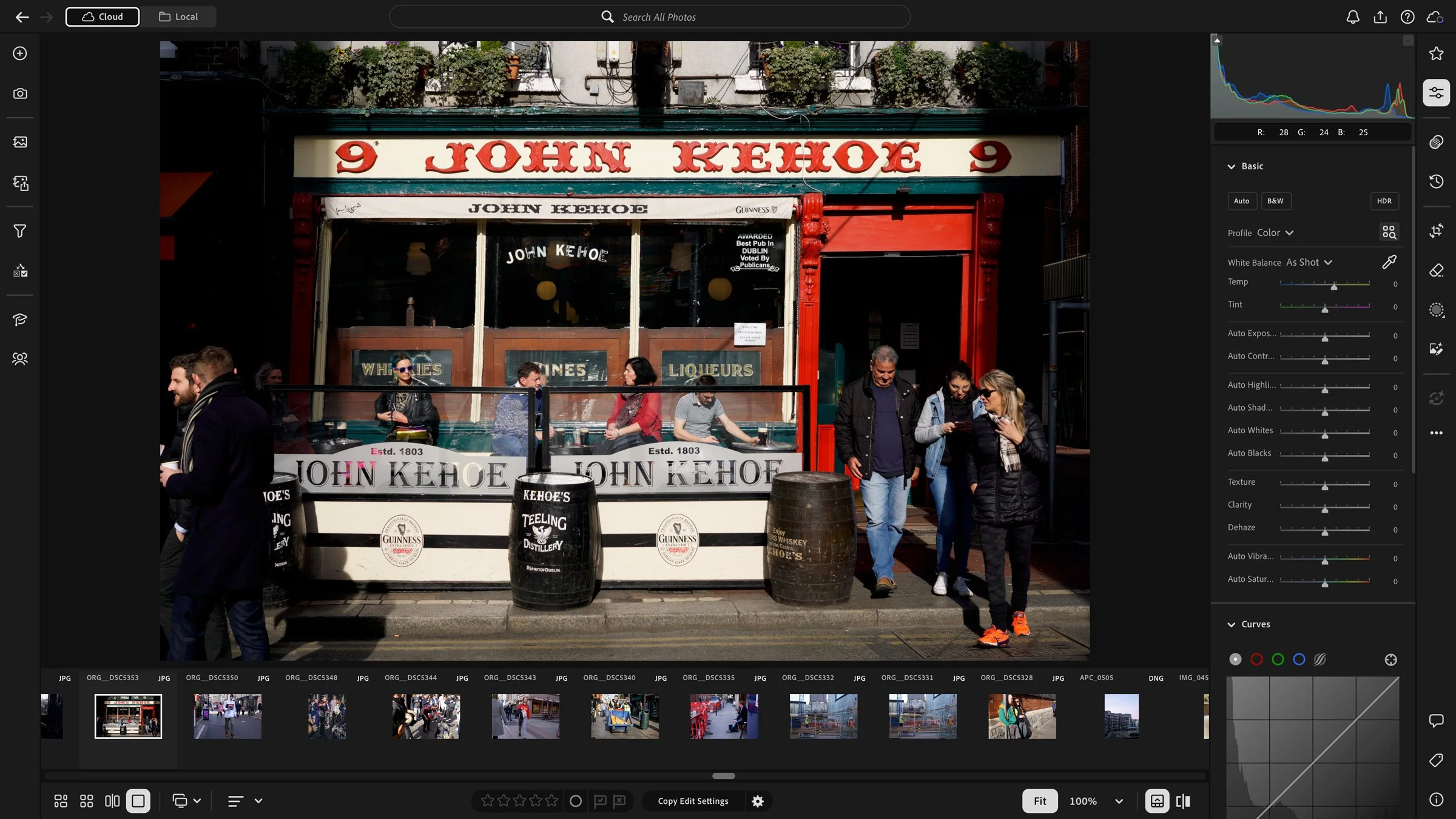
On the editing side, it gets most of the same new tools as Lightroom Classic 16: the new Glow effect (with five styles, including Bloom, Halation and Diffusion), Colour Grading within masks, AI-generated depth masks for photos that don’t have depth information, the Vectorscope, the Projection slider for fixing wide-angle distortion, and the new AI blemish removal.
There’s also a new Survey view for comparing a bunch of similar shots, multiple versions in Local mode, and customisable workspaces, including support for Lightroom Classic keyboard shortcuts, which is a nice touch. The Temp slider now goes down to 1500 for raw files too. Open Eyes, which uses another photo of the same person to fix a blink, is here as well, although it’s still in Early Access. The full list is in Adobe’s release notes.
Lightroom Mobile 12 brings tethering to the iPad
Lightroom Mobile 12.0 also gets Glow, with ten presets plus sliders to fine-tune the look, improved Blemish Removal, and an AI Assistant (in Early Access) that lets you describe the edit you want and then refine what it does.
The bigger news is on the iPad, which now gets tethered capture as well as more detailed People masking. Being able to plug a camera straight into an iPad and see the shots come in as you work could be really handy, especially if you don’t want to lug a laptop around. Those two are iPad features, so don’t assume you’ll get them on an Android tablet. Details are in the mobile release notes.
Keyword Architect Pro wants to fix your keyword mess
Keyword Architect Pro is a new plug-in for Lightroom Classic that’s designed to help you clean up your keyword hierarchy. It’s made by photographer Thomas Gerhardt, who says he built it because hundreds of keywords had piled up in his own master catalogue without any real structure, which I suspect a lot of people can relate to. As he points out, AI keywording tools tend to make this worse, as they add plenty of new keywords but not much organisation.
It shows your keyword hierarchy in its own window, a bit like a folder browser, and it has tools for finding unused keywords, spotting duplicates and similar spellings, moving whole branches around, and merging duplicates while keeping both the photos assigned to them and their synonyms. You can also batch-edit synonyms across lots of keywords at once, which is really tedious to do in Lightroom itself.
It needs Lightroom Classic 13.5 or later, and runs on Apple Silicon Macs and 64-bit Windows. It’s a one-off purchase rather than a subscription ($45 for a single licence), and there’s a 14-day free trial that doesn’t need a credit card.
Nitro Photo gets a Liquid Glass makeover
Nik Bhatt released Nitro Photo 2026.09 on November 4th, and the big change is a refreshed interface with Liquid Glass support. The bottom bars are gone, which gives you more vertical space, and the brushing controls have been moved around to work better on smaller screens. Other changes include a better video playback interface, borders that can sit outside the image rather than covering it, and linear DNG and ProRAW files are now identified in the Info area.
You may already know how I feel about Liquid Glass after the Pixelmator Pro redesign, so I’m curious to see how it works here. I’m not sure if the screenshots are up to date, but it doesn’t look too bad.
The important thing to know before you update is that the minimum requirement is now iOS 18 or macOS Sequoia. Nik says supporting so many older operating systems was slowing down development. You can read more in his announcement.
It should be noted that this is one of the few applications that lets you use RAW 9 that was released as part of macOS Golden Gate
Excire Foto 2027 can now search inside your videos
Excire Foto 2027 has a free update to version 5.1, and the main new feature is much better video indexing. Previously, it more or less tagged a video based on a single frame, but now it analyses frames from multiple scenes throughout the clip, so if something only shows up halfway through a long video, you should still be able to find it. You can tweak which frames it uses and save individual frames as photos.
Other additions include automatically turning GPS coordinates into place names and a filter for finding photos with missing metadata. Note that existing videos need to be re-analysed to take advantage of the new indexing, and the app will ask you about this after you update. There’s a full breakdown on Excire’s support site.
If you shoot a mix of stills and video when you travel, being able to search by what’s actually in a clip, rather than just by its thumbnail, is a pretty big improvement.
Help Support the Blog
Check out my eBooks and Presets
Check out my photography eBooks , Capture One Styles, and Lightroom Presets available on GumRoad.
Subscribe to my YouTube Channel
Check out my YouTube channel for tutorials, Vlogs, and more!
Sign up for the Newsletter
I have a Newsletter now where you can get regular updates by email. You can sign up here on Substack.
Note that this post contains paid affiliate links. We get a small commission for purchases made through these links, which helps run this site.