
DXO have launched the latest upgrade to their RAW pre-processing software, DXO Pure RAW 6. If you’re unfamiliar with the application, it basically lets you convert Raw files to DNG using DXO’s technology, including the companies excellent noise reduction software, Deep Prime. It does so in a way that maintains edit-ability and so you can use it to work with software such as Lightroom or Capture One, but bypass their raw conversion engine to use DXO’s instead. The latest version adds a new version of DeepPrime for Beyer sensors, adds a feature people have been wanting since version one, and another new tool that was quite unexpected but works surprisingly well. Read on for the details…
DeepPrime XD 3
The last version of PureRAW introduced DeepPrime 3 which was a step up from version 2 in that it was more natural looking with fewer artefacts. However, it came at the expense of the extra detail of XD2. Interestingly, the X-Trans support that they added in Pure Raw 5 did have the XD version, and could be noticeably more detailed. Well, in Pure RAW 6, they have unified the engine, so now you have DeepPrime 3 XD (extra detail) across all sensor options.
I did a few quick tests on this and you can see the difference. There is definitely more detail in XD3 compared to just ordinary DeepPrime 3. The results are quite impressive, it has to be said. I tried it across a number of files, and it creates a very clean and detailed image, and it doesn’t look too unnatural like earlier versions of DeepPrime (particularly version 1.)
The one thing in particular that I noticed is that you can get away with using a higher sharpening value than you could previously without the results looking too unnatural. This will depend on the image of course, and this is just a casual observation, as I haven’t done any scientific testing. I find that I would have to leave it on “soft” most of the time on XD2 to get natural-looking results, but with XD3 I can go to “strong” and it doesn’t look as overcooked. You can try this yourself and see how you get on, as everyone’s tolerances and expectations as to what looks right is different and subjective.
I tried this on a ridiculous example. I shot a few images at a famous old shopping centre in Dublin on my old Sony A6000 at ISO 10,000 and 25,600. Now, normally I wouldn’t use this camera above ISO800 and definitely not above 1600.
Original image straight from the camera (click to view large)
DeepPrime 3 XD (click to view large)
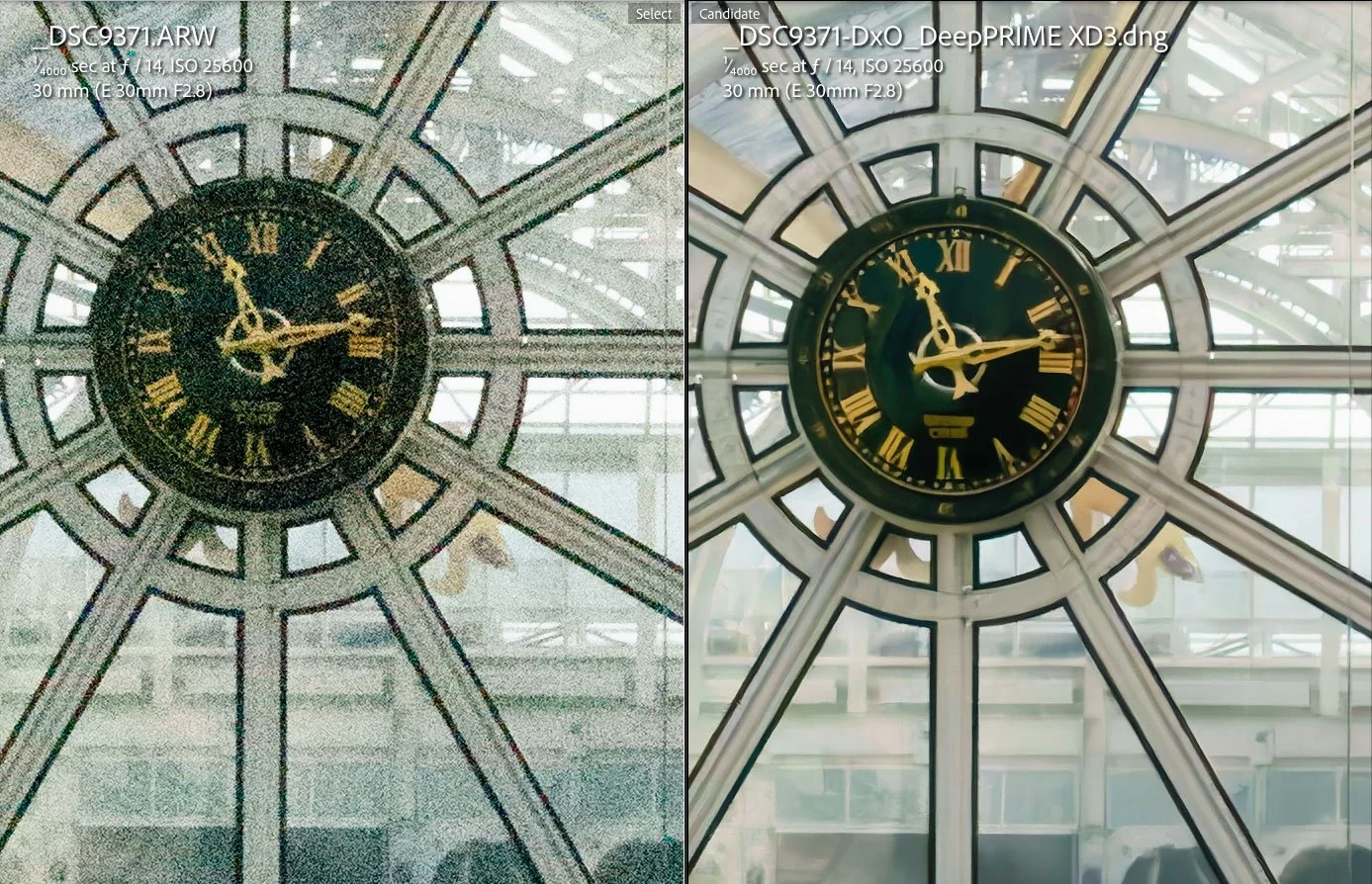
200% crop
The results out of camera are clearly unusable. It’s not just noise, but there’s lots of colour smearing and a loss of detail. Deep Prime does a remarkable job of recovering the image. To be fair, so does Adobe’s Denoise, but with PureRAW you also get DXO’s module based sharpening too.
Here’s another example, also shot at ISO 25,600 and again, PureRAW makes a useable image out of it.
Original - Click to view large
Deep Prime XD3
Closeup Crop (click to view large)
Compared to Adobe Denoise (on the left) - Click to view large
To be fair, these are extreme examples, and there’s only so much you can do.
DNG Compression
The biggest complaint about PureRAW is that the file sizes are often much larger than the original RAW files. This is due to the nature of the way RAW images are stored compared to demosiaced DNG files, but the end result was always a bigger file. This wasn’t just a Pure RAW issue, but with anything that converts RAW files to DNG like this, including Adobe’s own Denoise and Super Resolution, until they changed the way that works. Well, in this version they have introduced “high-fidelity compression” which shrinks the file sizes quite a bit, at least down to the size of the original RAW files.
I think a lot of users will be delighted about this. The number of times people have contacted me to complain about his, not just in PureRAW but also in the old “Enhance” dialog box in Lightroom, is quite something. I even had to write an explanation about it at one time to explain why this happens, as many people weirdly assumed it was due to some kind of weird conspiracy or just pure incompetence. (It’s actually because a RAW file only stores the value of light hitting the sensor sites, whereas linear DNG files store pixel values for each colour channel, so it's effectively three times the information (that's the short short version)
For example, On a 24mp file from my old Sony A6000 (which does compress the RAW file slightly too) - the RAW file is 25mb. An uncompressed DNG file from PureRAW is 109 mb while one using the new high-fidelity compression option is only 17mb.
Sensor Dust Removal
The feature I wasn’t expecting was automatic sensor dust removal. I was quite surprised when they announced it at the press briefing. I also wasn’t expecting too much, but based on my brief testing with the pre-release version, this actually seems to work quite well, at least on the image I tried.
Automatic dust spot removal (click to view larger)
I went through my library and found an image from my old Canon 5D Mark I that I knew had dirt on the sensor and opened it in PureRAW 6 to see what would happen, and to my surprise it caught all but one of the dust spots on the sensor. The only one it missed was the one that was over the crane. It seems it might have issues with sports where there is other detail obscuring it, which, in fairness, is difficult to correct for. I didn’t do extensive testing on this with lots of images, but it seems to work, at least on obvious spots on the sky.
Batch Processing Improvements
They have also added some batch processing improvements. The software will no process images in parallel, so this should speed up the processing of large batches.
Conclusion
Overall, I think this is a solid update to PureRAW. The compression alone is worth it if you’re a user of previous versions, although, as always, you should try before you buy. If you’re not a user, but you’re curious, then download the trial version and give it a go. It really depends on your images, your camera, and your lens as to whether you will get a significant advantage over Adobe’s own Denoise. However, PureRAW does offer DXO’s lens calibrated sharpening, which compensates for the differences in optics across the frame. It does also create standalone DNG files, which some people are still annoyed at adobe for taking away in the latest versions of Lightroom. It is maturing into quite a solid product now, and it’s probably the DXO software that I use the most personally. Now if they would just add high quality up-ressing ……
The software is available now from the DXO store. Pricing is as follows:
New license: $139.99 / 129.99 € / £119.99 Upgrades: $89.99 / 79.99 € / £74.99
A 14-day trial version is also available from the website. You can use my code: ThomasFitzgerald15 to get 15% off (new customers only, I’m afraid)
Note that this post contains paid affiliate links. We get a small commission for purchases made through these links, which helps run this site.