tumblr counter

Fuji X-Pro 1 Support Comes to Lightroom. A Quick First Look

X-Pro 1 Support has finally come to Lightroom and Camera Raw. Many people have been eagerly awaiting this and now that it’s finally here I took a little time this morning to have a look and see what it was like. I’ve kept all the raw files from everything I’ve shot so far, so it was simply a matter of going back and loading them into Lightroom. So what’s it like? Unfortunately it’s a good news, bad news kind of situation.

On the one hand, it handles highlights much better than Silkypix. I was able to recover highlights much better than I ever could using the supplied Raw converter. The overall tonality is quite nice, and colours are handled pretty well. They’re a little different from what the camera produces in JPEG, but this is normal. They’re also a littler different from what Silkypix produces, but nothing too onerous.

On the down side, there are two issues. One minor, the other major. The minor one is that they didn’t provide camera profiles like they did on other cameras, so they haven’t profiled the various modes (i.e. Velvia etc) It’s not that big a deal but it would have been nice.

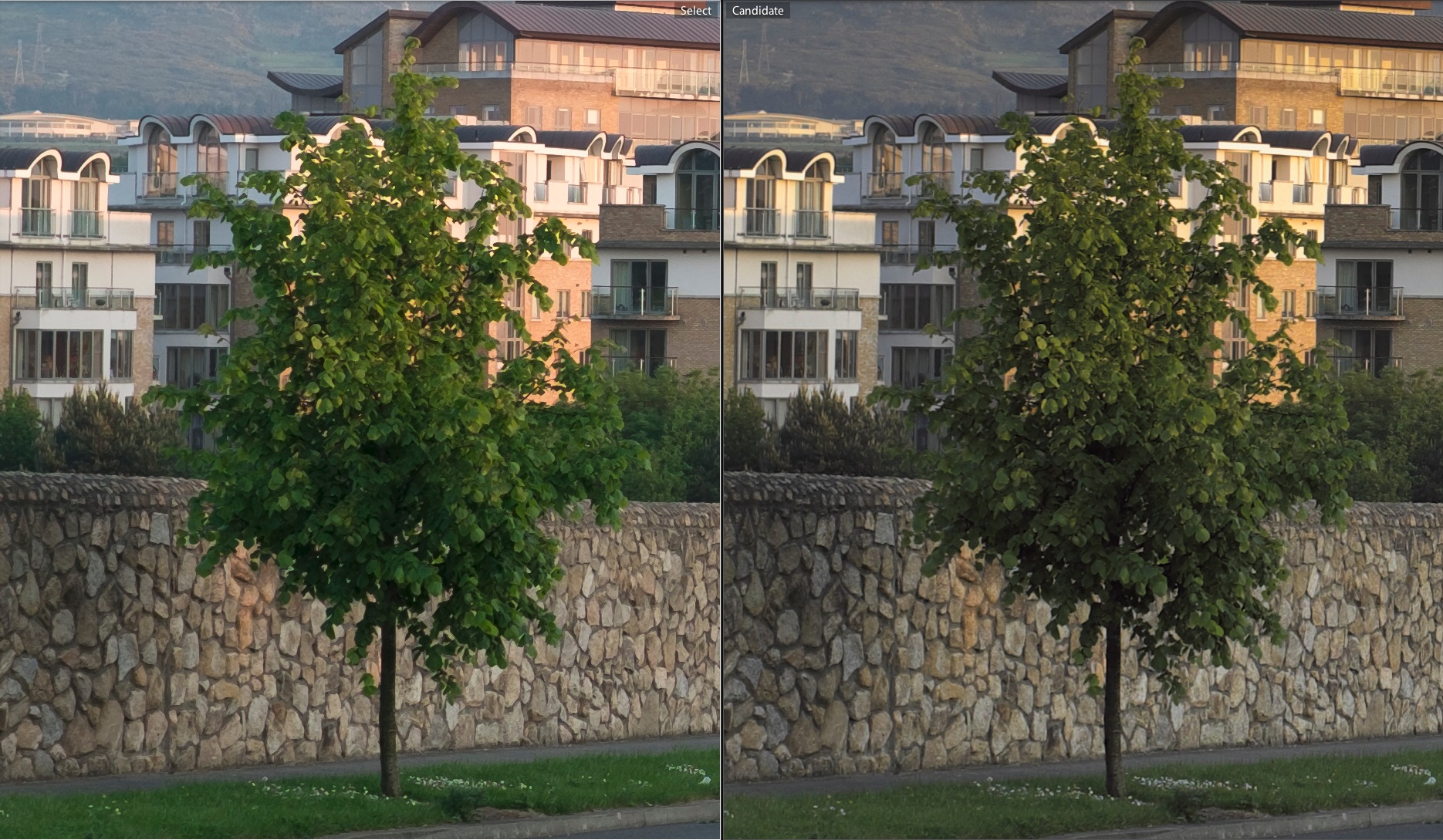
The major problem is the way it handles fine detail. It get’s completely smeared to mush. here’s an example:

Click on the image above to view full size (you might need to download it if your window is small). The one on the left is from Lightroom. The one on the right is from Silkypix. The wall is completely smeared and the fine detail in the bricks on the buildings is gone. The whole effect is like a painterly filter has been put over the image. It doesn’t look too bad when you just see an excerpt like above, but when you see the whole thing on a 27″ display, it stands out. It’s very disappointing.

There was no noise reduction on either, in case someone decides that it musty be my own fault (as is the way on the internet when someone points out something wrong)

Anyway, I’ll explore some more and do a full report later, but initially, I have to say, I’m very disappointed.

, , , , , , ,

Please Read The Comment Policy Before Posting a Comment

11 Responses to Fuji X-Pro 1 Support Comes to Lightroom. A Quick First Look

  1. Nicolai Perjesi May 30, 2012 at 9:24 pm #

    Same here, no good at all…. It is like there is a filter all over the pictures.nvery dissapointing indeed.

  2. Lk May 30, 2012 at 11:01 pm #

    From your sample, I don’t see any smearing. The green channel seems to be a bit stronger hence a loss of contrast but nothing you can’t adjust in lightroom…

    • Lk May 30, 2012 at 11:03 pm #

      Sorry I do see a little bit of ‘filter’ artifact..

    • -S May 31, 2012 at 1:41 am #

      Side by side, 100% crop in Lightroom, you will see it and feel the pain.

  3. -S May 31, 2012 at 1:38 am #

    Yup, just try with 6 pairs of JPG vs. RAW from ISO 3200 to ISO 6400 at night, this is… not good. The RAW files have a really weird kind of grain, it’s more a smear than a grain really, and no amount of noise reduction make that smear look as good as the JPG. That’s disappointing. On the other hand I’ve had that camera for almost 2 months and I really like the JPEG output, I got used to it.

  4. Alex May 31, 2012 at 3:24 am #

    How does it compare to the camera JPEG ?
    Maybe ACR and DCRAW are missing something in the algorithm so far, if the camera engine can pull it off, then computer algorithm ought to be able to replicate the results.

    • -S May 31, 2012 at 3:34 am #

      It’s worse than camera JPEG from what I’ve seen so far in low light / high ISO. And because it’s doable in-camera doesn’t mean it’s easy to replicate in Lightroom; demosaicing, especially with new sensors, is notoriously nasty. The PhotoRaw guy has published 3 posts about it so far, and his guesses are probably better than anybody else’s…

      • Alex May 31, 2012 at 4:35 am #

        Yes, I have read them all. I don’t mean it’s easy or anything, just possible. What happen in camera is just algorithms as well, so I see no logical explanation why one thing could be done inside the camera and not outside.

        It might be truly difficult for ACR (or other engines) to do for the moment, as it might require a complete overhaul of current algorithms, but I would think it’s not fair to conclude that the sensor is _bad_ because current software offering are not able to process the output properly yet.

  5. Brian May 31, 2012 at 3:11 pm #

    So, as of right now – what do you guys think the best RAW converter for this camera is?

    • thomas May 31, 2012 at 3:16 pm #

      The one that comes with it Fuji’s version of Silkypix seems to be the best quality, but it’s not great at handling highlights and it’s a bit of a dog to use – but it produces the best quality in my opinion.

      The biggest problem I have with the JPEGs is the colour bleeding. If you have areas of high colour contrast – e.g. a yellow against blue or grey or something – there’s a substantial amount of colour bleeding. You don’t get that with the raw files and silkypix.

Trackbacks/Pingbacks

  1. lightroom x pro support ist da - bin gerad am downloaden - Seite 9 - May 31, 2012

    [...] [...]

Leave a Reply