One of the things that struck me about the new artificial intelligence based automatic function in Lightroom was that it sounded a lot like Luminar’s accent AI filter. I was curious to see how they would compare, so I made a quick video see.
Thomas is a professional fine art photographer and writer specialising in photography related instructional books as well as travel writing and street photography.
All in Lightroom
One of the things that struck me about the new artificial intelligence based automatic function in Lightroom was that it sounded a lot like Luminar’s accent AI filter. I was curious to see how they would compare, so I made a quick video see.
Adobe has issued some updates for both version of Lightroom today, and they add a few new features as well as the usual round of new camera support. Of particular note, Lightroom CC now gets some of the features that were missing, including a point curve tool, and a split tone tool. Of note in the new camera compatibility, is the addition of Sony A7RIII raw file support.
Ever since Lightroom CC was announced - The new cloud based cut down desktop version - not to be confused with the old normal version - I have been thinking about ways to get around some of its limitations. The solution was to create a set of presets that allowed you to apply some of the effects that Lightroom CC is missing.
A little while ago I put up a poll on the site here, asking if people were planning on using Lightroom CC or not. It was in part, to answer my own curiosity as to whether or not people were going to use it, but also to gauge interest for supporting it in the future. Now that it’s been up for a while, I thought I would share the results.
Lightroom Classic is essentially Lightroom 7 in Adobe’s weird new naming scheme. If you look in the about box, you will see the version number is listed as a 7.0 release. While a numbered upgrade like this is normally a major feature release, Lightroom Classic seems to offer relatively little in terms of new features since the previous version. The main areas are the new masking tools, improved importing and overall performance improvements.
I have been going back and forward on whether or not Lightroom CC is something I should bother investing any time in. On the one hand, I do think there are certainly uses for it, but given the lack of features, it’s kind of limiting. Having said that, I do have some ideas for how to get around some of them. However, before investing any time and energy in these, I wanted to know if anyone was actually planning on using it.
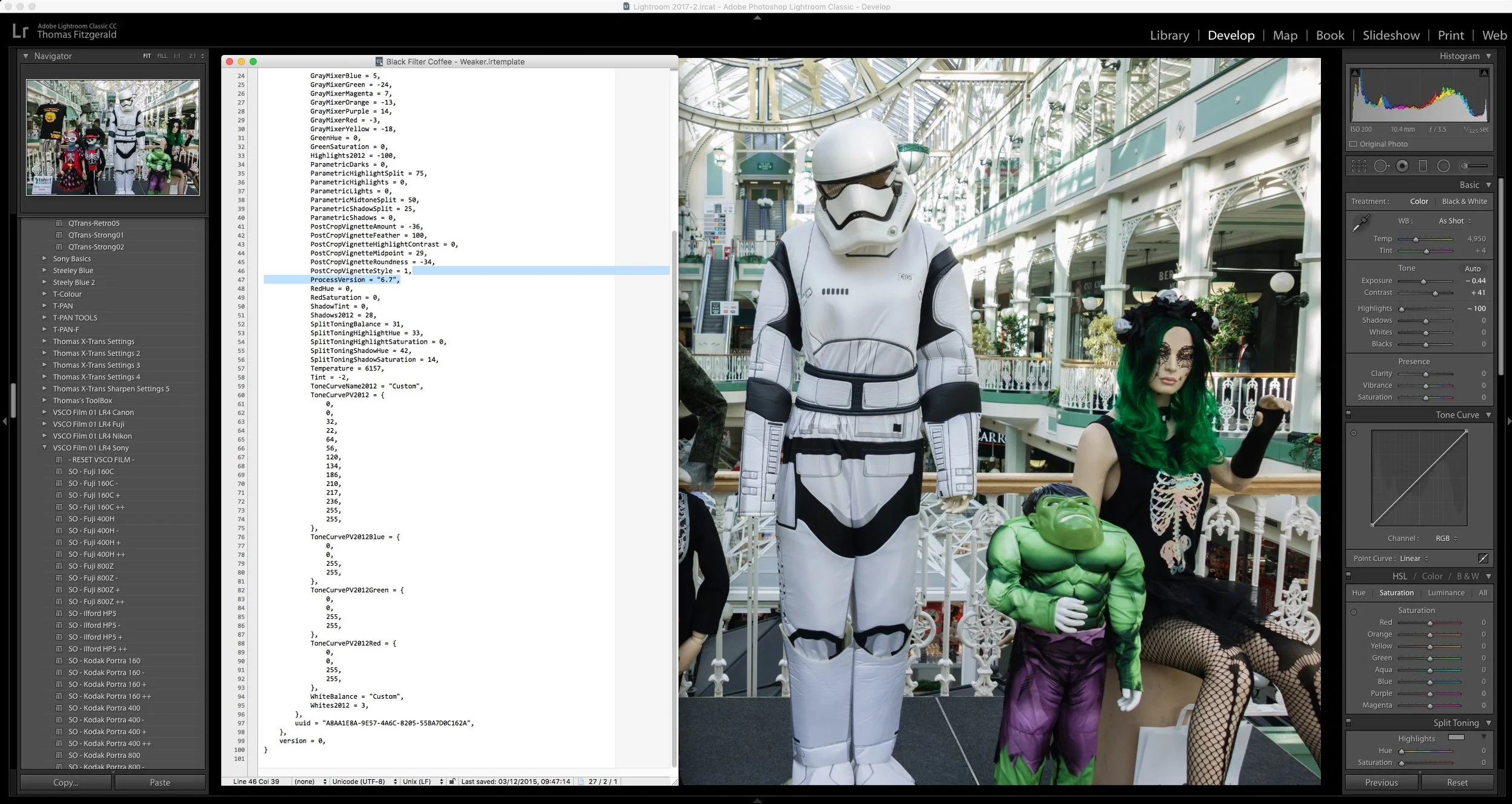
One of the things that you may not know is that Lightroom preset files are actually fairly easy to edit outside of Lightroom. The .lrtemplate files are just plain text files formatted as XML code. So, while not for the faint-hearted or technically challenged, if you know what you’re doing, you can actually open the files in a text editor and make changes. Obviously, you don't need to use BBEdit for this, any high-quality text editor will work.
Unless you’ve been living under a rock the last few days, you’ve undoubtedly read about the updates to Lightroom, specifically the split into two versions. I’m swamped with a client job at the moment (some design work) and so I haven’t had the time to devote as much to checking out the new versions as I would like. With that in mind, I will have a more detailed analysis on the Adobe announcements next week, once I’ve done thorough testing, but for now I wanted to give you my first thoughts.
In case you missed this on my store blog, I’m having a half price sale on some of my Lightroom Presets at the moment. In order to celebrate the arrival of Autumn, my favourite time of the year for photography, I’m reducing the price on a selection of my Lightroom Presets by half.
I have recently been admiring some photographers on Instagram who are shooting on film and using Agfa Vista. I couldn’t get any of this film locally, so instead, I wanted to see how close I could re-create the look digitally using my X-Pro 2 as the source. In this video, I look at how I used Lightroom and VSCO Film to create the “Agfa Vista” film look.
A little while ago I got up early in the morning and headed to a little fishing town just north of Dublin to get some morning shots of the sleepy port coming to life. I had originally hoped that it would be a nice bright morning, and that I would capture the early rays of the sun over the sea and the harbour, but instead a thick cloud was down, and it was beginning to rain.
In this video, a follow up to my previous one on shooting street photography on film, I look at how I process the film after scanning in Lightroom.
I thought my eyes were deceiving me when I read this post in the official Lightroom blog this morning. It seems that Adobe has finally agreed to what its users have been telling them for years. Lightroom’s performance is abysmal.
If you follow photography news at all, you’ve probably read about this new site called pixelpeeper.io (not to be confused with Pixelpeeper.com). It’s a web application that lets you see what Lightroom edits were done to an image, just by uploading a Jpeg to it. Now, on top of that they’ve added the ability to see what Lightroom preset was used on an image (if it was something like one of the VSCO presets), again just from uploading a Jpeg. I have mixed feelings on whether or not this is a good idea, and I’ve gone back and forth in my mind as to whether I agree with what they’re doing or not
I recently spent some time in Galway city, in the west of Ireland, and while I was there I was taking some photos around the harbour and the railway station. As I was capturing the images, it occurred to me that they had an urban decay feel to them, and I thought they would be perfect for my Industrial Iron set of presets.
Recently I was going through some old blog posts, and I came across a Panorama image that I really liked. Unfortunately, I had lost the original high res versions, and all I had left was the low res one that was posted to the website. However, I managed to find the original Raw files that I used to create the image, and so in this video I show you how I re-created the Panorama in Lightroom and Photoshop
I’m happy to announce that my latest set of Lightroom Presets, Industrial Iron, are now available. I teased these a few weeks ago, and they’re now ready for launch. This Idea for Industrial Iron came about when I was processing some images of a German townscape that I took on a dull and rainy day. I had wanted to create a look that was industrial, and spoke of urban decay, and this is what I came up with.
I’m delighted to announce that my latest set of Lightroom Presets, FilmLUX 2 is now available. FilmLUX 2 was designed to create a subtle “film” like look to digital images, without them looking overly processed. With many presets, and even when processing manually, it can be easy to take your images too far and have them look like they’ve been heavily treated. With FilmLUX 2 I wanted to create a set of looks, that could enhance an image without it looking like you’ve done an extensive amount of work to it.